blog
Building AI-friendly documentation
Most companies spend real effort making their website attractive to buyers. Product pages are designed with care, landing pages are tuned for conversions, blog posts are built around keywords. Documentation usually gets less of that attention, and that is a missed opportunity now that people research products inside ChatGPT, Claude, Gemini, Perplexity, and Grok.
When someone asks an AI how a product works, the assistant needs reliable information to answer. Often the most useful material is not on the homepage or in a marketing article. It is somewhere in the documentation. Making those docs clear, accessible, and well structured helps both people and machines find what they need, which is the whole idea behind AI-friendly documentation. It is less a new kind of website than an old discipline that suddenly matters more.
What AI-friendly documentation means
AI-friendly documentation is organised and written so AI systems can reliably discover, retrieve, and interpret it. That is simpler than it sounds. Picture a user asking ChatGPT, "Does this analytics platform require cookies, and where is the visitor data stored?" A well-documented product has a page on its cookie policy, another on data storage, and a technical article on how tracking works. If those pages are public, clearly written, and linked to each other, an assistant with web retrieval has a good chance of finding the answer.
Now picture the same facts scattered across marketing pages, an outdated PDF, a few support tickets, and a JavaScript interface that automated systems cannot read. The product might have exactly the feature the user wants, but the information is harder to verify. That gap is what AI-friendly documentation closes.
Why documentation matters for AI search
Traditional SEO put most of its attention on landing pages and blog content. Documentation served a different job: helping existing users understand a product. AI search is blurring that line. A buyer might ask Claude whether a SaaS platform supports a certain API, ask Perplexity which consent management platforms support Google Consent Mode v2, or ask Gemini which analytics providers offer EU data hosting. A marketing landing page rarely answers those well. Documentation can, because technical docs tend to hold the specific, verifiable detail an assistant needs to build a useful answer.
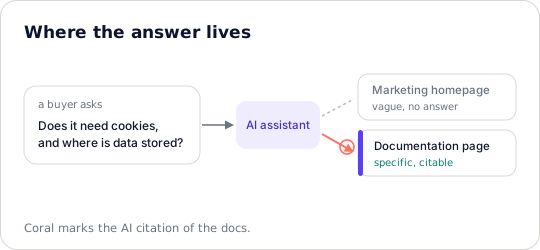
For a detailed question, the homepage rarely has the answer. The documentation does, and that is the page an assistant can cite.
None of this means documentation automatically earns more AI citations than other pages. There is no rule that favours it. But when the question is technical, detailed product documentation is usually a much better source than a general marketing page.
AI systems do not all read the web the same way
It is easy to assume every assistant crawls the web the same way. They do not. Some retrieve live pages, some lean on a search index, some use external retrieval services or content learned in training, and many mix these depending on the question and the tools at hand. So making your docs reachable by one crawler does not guarantee every assistant will use them. A page in Google Search might reach Gemini through one path while Claude or Perplexity find it through another. The practical takeaway is steady: make documentation accessible through standard web technologies rather than optimising for a single AI platform.
Start with documentation that answers real questions
The first improvement has nothing to do with technical SEO. It is about the questions your docs answer. Many documentation sites are organised around internal product terms, which make sense to the team that built the software and little sense to someone meeting it for the first time. Compare a page titled "Configuration parameters" with one titled "How to configure cookie consent categories." The second says what it is about, which helps readers, search engines, and retrieval systems alike.
The same goes for the content. A page about an integration should answer the questions people actually have. What does it do? What do you need before setting it up? How does it work? Where are the limits? What happens when something breaks? Answer those clearly and the documentation becomes useful well beyond your existing customers. It becomes part of how people discover you.
Structure helps, up to a point
AEO and GEO discussions often imply every page needs dozens of headings, tables, and FAQ blocks. It does not. Good documentation needs a logical shape, not decorative formatting. A technical guide can open with what the feature does, then cover requirements, steps, examples, limits, and troubleshooting. For many topics that is enough.
Use headings that describe the actual content. Keep related information together. Resist splitting one explanation across several pages without a reason, and for long guides add a table of contents so people and machines can navigate. The goal is to remove ambiguity. If a human can quickly find the answer to a specific question, the structure is probably sound.
Give AI systems something specific
Vague language is common in marketing and actively unhelpful in documentation. "Our platform offers seamless integration with leading marketing technologies" says almost nothing. "Our platform integrates with Google Tag Manager and supports Google Consent Mode v2, including consent signals for analytics and advertising storage" says something an assistant can use, to answer a question about integrations or to compare you with an alternative.
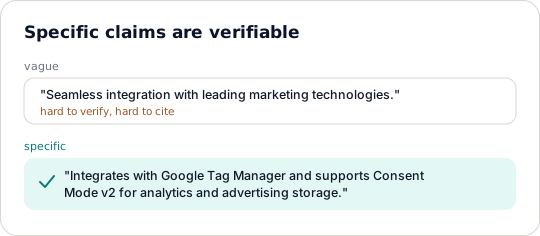
A specific, checkable claim is easier to verify, compare, and cite than a broad one. Name the API, the region, the version.
Not every sentence needs to be dense with detail. The important claims need to be explicit. If your product supports a particular API, name it. If data is stored in the EU, say where. If an integration needs a paid plan, say so. Specific information is easier to verify, compare, and reference than a broad claim.
Make documentation reachable by crawlers
Even excellent docs help no one if a retrieval system cannot open them. Documentation should live on normal HTML pages with stable URLs. Important content should not depend entirely on client-side JavaScript, a login, or interactive elements that automated systems struggle with. JavaScript itself is not the problem, since many crawlers render it to some degree. The problem is relying on rendering that is not consistent across every retrieval system, so server-rendered or pre-rendered HTML is the safer foundation for public docs.
It is also worth reading your robots.txt and knowing which automated systems you allow. Not every AI bot does the same job: some crawl for search, some for model training, some fetch a page in response to a user's question. Knowing the difference lets you make deliberate choices instead of blocking a system you meant to reach.
What about llms.txt
The llms.txt proposal has drawn attention as a way to help language models navigate a site, by offering a curated Markdown file that points to the important content: product docs, API references, technical guides. For a documentation-heavy site that sounds useful, and it may be. The limit is worth stating plainly: llms.txt is not yet a universally adopted standard, and there is no reliable evidence that adding the file on its own improves AI citations. Some tools support it; major AI platforms have made no consistent public commitment to using it for search or recommendations.
Experimenting with llms.txt is reasonable, especially if your documentation is large. Just do not treat it as a substitute for sound information architecture, internal linking, accessible HTML, and XML sitemaps. Those fundamentals matter whether or not llms.txt catches on.
Use examples, not just explanations
One of the most useful things documentation can offer is a concrete example. If a developer asks an assistant how to implement an API endpoint, a conceptual explanation helps, but a page with working code, request parameters, an example response, and error handling gives the assistant far more to work with. The same holds outside engineering. A guide on configuring analytics goals is more useful with a worked example, and a page on consent categories is clearer when it shows how the categories map to real integrations. Examples cut down on interpretation, which is exactly what you want when an assistant is asked to solve a specific problem rather than describe a concept.
Keep documentation current
Outdated docs have always been frustrating. With AI search they cause a second problem: if an assistant retrieves an old page describing a feature that no longer exists, it can hand the user a wrong answer, and that user may never visit your site to catch the mistake. Documentation maintenance becomes part of managing your brand visibility.
When functionality changes, update the docs. When an API is deprecated, say what replaces it. When pricing, integrations, or limits change, make the public information match the product. For a larger documentation site it helps to give important pages an owner and a review cycle. Versioned docs are especially useful for developer products, since they make clear which instructions apply to which version. An assistant cannot always tell whether an old page still applies, so clear version labels and a canonical page reduce the guesswork.
Connect documentation to the rest of the site
Documentation should not feel like a separate universe from the product site. If a marketing page claims support for an integration, link to the doc that explains it. If a blog post raises a technical problem, link to the implementation guide. If a doc introduces an important concept, link to the related explanation. For traditional SEO, internal links help search engines understand how pages relate; for retrieval systems, those same connections make supporting information easier to find. There is no need to turn every paragraph into a pile of links. A few placed naturally beat dozens of unrelated ones.
Can documentation improve AI product recommendations?
Possibly. Imagine someone asking Claude, "Which analytics platforms support privacy-friendly tracking without cookies?" The assistant needs information about each product to answer. A company whose docs explain its tracking method, privacy controls, data processing, and technical limits gives the model more to evaluate than a competitor offering only a broad "privacy-first" claim. That is no guarantee the better-documented company gets recommended, since recommendations depend on the retrieved sources, the model, the user's requirements, and what is published elsewhere. But documentation helps establish whether a product meets the requirement at all, and for B2B software that is a real part of AI-driven discovery.
How do you know whether AI is using your docs?
This is where analytics gets interesting. Conventional web analytics shows whether visitors land on documentation pages, where they came from, and what they do next. AI assistants, though, can use a page without sending a visitor. Someone might ask Perplexity about an API integration, read an answer drawn partly from your docs, and never click. Another person might meet your company through ChatGPT and visit days later.
That is why AI citation analytics and prompt tracking sit usefully alongside the conventional kind. With Voris you can track relevant prompts across ChatGPT, Gemini, Perplexity, Claude, and Grok to see where your brand shows up in AI answers, and follow AI citations and referral traffic to see which assistants send visitors and what those visitors do on your site. These are related signals, not the same thing: a citation does not guarantee a click, and a click does not prove a particular doc change caused the recommendation. Watching both still beats reading organic traffic alone.
A practical way to start
You do not need to rebuild your documentation site to make it more AI-friendly. Start with the pages that matter most to prospective customers and developers: core product docs, important integrations, API references, security and privacy information, and the common questions. For each one, check whether the information is accurate, whether the title names the topic clearly, and whether someone new to the product could follow the explanation.
Then check the technical basics. Can the content be read without logging in? Is the important information in HTML? Are the URLs stable? Do internal links connect related topics? Are the key pages in your sitemap? With those in place, start monitoring the questions buyers actually ask across the assistants, and look for gaps between what your product supports and what the AI says it supports. If an assistant keeps getting your integration wrong, check whether the doc is unclear, outdated, or hard to find. If competitors keep appearing where you do not, look at what evidence supports them. Not every gap has an obvious fix, but this gives you somewhere real to start.
Documentation is becoming part of marketing
For a long time documentation was a support function. Marketing attracted customers, sales converted them, docs helped them use the product. AI search softens those boundaries. A developer may find you because an assistant referenced your API docs. A marketing manager may shortlist you after Gemini explained your privacy capabilities. A technical buyer may ask Claude to compare integration requirements across three vendors. In each case the documentation is part of the buying process, which is not an argument for turning doc pages into sales pages. Their value is in being accurate, specific, and useful. Treat documentation as a serious public resource and you give both customers and AI systems something better to work with.
There is no writing style that guarantees a citation, no heading structure or file that makes weak content authoritative. The fundamentals are quieter than that. Make the important information public, explain it clearly, show examples, keep the technical claims accurate, connect related pages, and maintain it as the product changes. Then measure whether your brand and your docs show up in the AI answers that matter to your business. AI-friendly documentation is really just documentation with fewer assumptions and less friction, which was good practice before AI search and matters more now.